How to configure vodafone sip-voip trunk in asterisk vicidial freepbbx
Step by step guide to configure vodafone SIP trunk in asterisk based systems like vicidial goautodial freepbx. In this article i have included the SIP settings required for vodafone voip trunk configuration required in asterisk as well network settings required to terminate the vodafone trunk gateway.
Vodafone – asterisk
Vodafone – vicidial
Vodafone Idea SIP:
Vodafone Idea Business, offers Managed SIP service for businesses for whom voice calls are a key business resource with Vodafone Idea Managed SIP (MSIP), these organizations will now have the assurance of security as well as a window to monitor, measure and optimize their voice infrastructure.
Vodafone SIP trunk Networking
The Vodafone SIP Trunking is provided in secure way of connection, Vodafone provides a dedicate network to connect to there SIP gateway to register the SIP trunk as per the below Architecture .
To connect to the Vodafone network your PBX/asterisk server should have provisioned with a dedicated ethternet port configured with the IP Subnet provided by Vodafone or you can redesign your network setup to pass both subnet in a single ethernet with static routing.

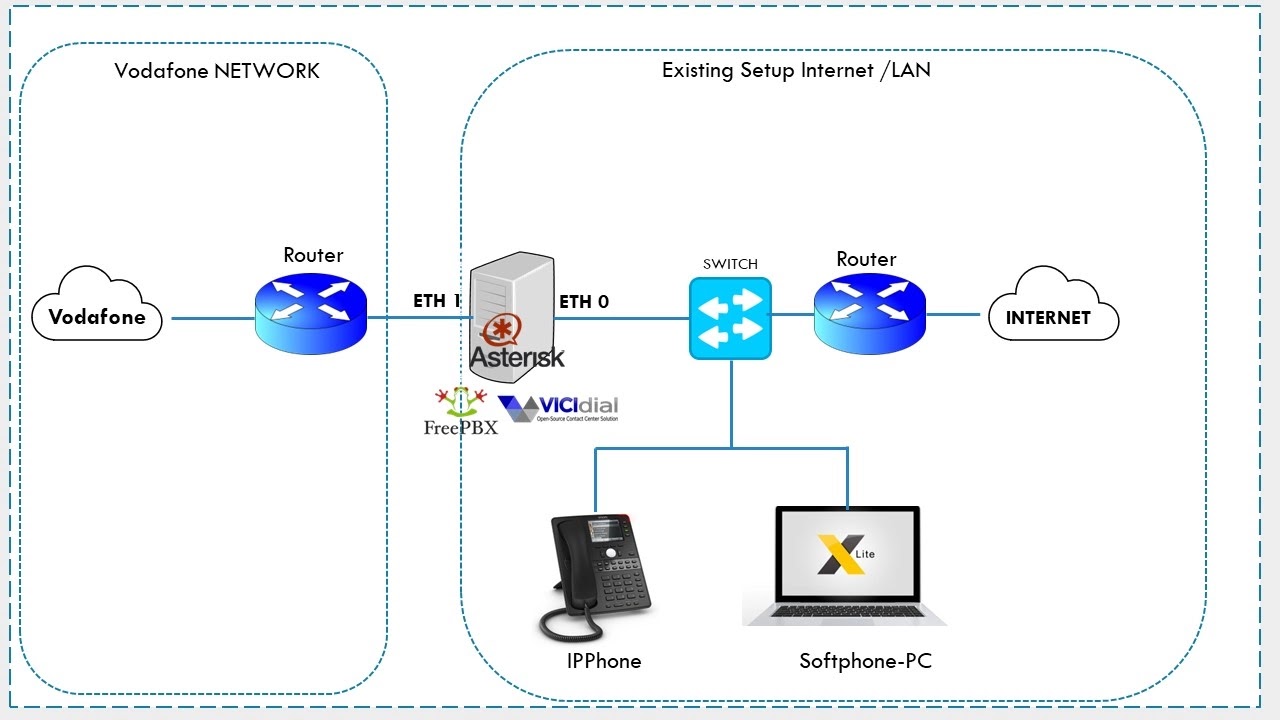
Vodafone SIP trunk Details:
Once you have purchased the new Vodafone sip trunk, you will be provided with below detailsPilot number
SIP gateway IP & Media IP – 10.229.37.12 10.229.50.11
Vodafone Network subnet range (10.229.37.12,10.229.37.10/27)
Step 1: Network Connection
As show in picture above ,connect your Asterisk server to the Vodafone network and assign the IP address from the subnet provided by Vodafone either to a second ethernet or existing ethernet port(based on your network design).
The network configuration is not covered here , it might defer between OS type you are using, but concept is same.
Step 2: Vodafone SIP Proxy Static route
If you are connecting Vodafone to your existing networks as pre the picture shown, then you might need a static route to reach the Vodafone SIP Proxy also media ip.
Strict RTP switching to RTP target address
Check your OS network settings to set static route to vodafone network.
Sample vodafone Sip details
SIP proxy ip : 10.229.37.12
Media IP :10.229.50.11
ServerIP : 10.229.37.13
gateway ip :10.229.37.10
interface : Eth1
Centos 7 command to set a static route to SIP proxy ip and media ip
ip route add 10.229.37.12 via 10.229.37.10 dev eth1
ip route add 10.229.50.11 via 10.229.37.10 dev eth1
Command to check the routes
ip route show
or
route -n
Step 3: vodafone SIP peer configuration sip.conf
Once you have setup the network , make sure you are able to reach the Vodafone gateway and SIP gateway ip by ping command.
enter the below sip settings in you asterisk sip.conf, if are using Freepbx you can create the same in Gui trunk settings, similar for vicidial/goautodial under carrier settings.
[vodafone]
type=friend
disallow=all
allow=alaw
allow=ulaw
allow=g729
host=10.229.XXX.XXX ;this is vodafone sip proxy ip
fromdomain=10.229.XXX.XXX ;this is vodafone sip proxy ip
qualify=yes
dtmfmode=rfc2833
nat=no
context=trunkinbound ;context to receive inbound calls
sendrpid=yes
trustrpid=yes
Step 4: asterisk dialplan for Vodfone sip
Note: The key factor to dial out via Vodafone is you need to set proper caller-id while dialing out.
Use the below dialplan , alter according to your requirement.
For vanilla Asterisk :
exten => _X.,1,Set(CALLERID(num)=+914412345678)
exten => _X.,2,Dial(SIP/vodafone/${EXTEN})
exten => _X.,3,Hangup
;+914412345678 is my pilot no, you have to enter your pilot no or any number from the DID range
Vicidial / Goautodial
exten => _X.,1,AGI(agi://127.0.0.1:4577/call_log)
exten => _X.,2,Set(CALLERID(num)=+914412345678)
exten => _X.,3,Dial(SIP/vodafone/${EXTEN},,tTo)
exten => _X.,4,Hangup
;+914412345678 is my pilot no, you have to enter your pilot no or any number from the DID range
Freepbx
If you want individual CID for each user make sure each user extension is configured with outbound callerid with there DID number.
For Freepbx, you need create outbound route , with necessary Dial pattern and make sure to set the ROUTE CID (either pilot or DID numbers)
Conclusion:
Hope the above tutorial is helpful to configure the vodafone Idea siptrunk in your sip server.
For professional support reach me via skype: striker24x7 , telegram https://t.me/striker24x7
Youtube Channel : https://www.youtube.com/c/striker24x7