How to configure (2FA) two factor authentication in vicidial
Step by step guide to enable and configure the two factor authentication in vicidial. In Vicidial Two-Factor-Authentication, 2FA for short, adds a required second step to the admin login process through a method other than a password, such as an Email, Phone Call or Text-Message -SMS.
Currently the 2FA is only supported for Admin web interface login. The 2FA for agent portal is no supported.
Vicidial 2FA OTP options:
2FA, or two-factor authentication, is an identity verification method that requires a user to provide a second authentication factor in addition to a password or two authentication factors instead of a password in order to access a web site, application or network.
In Vicidial the 2FA is include in march 2021 , For 2FA support the vicidial version should be latest SVN released after march 2021.
In Vicidial below are the list of available Two factor authentication options available to receive the OTP
1. Email
The ability for your webserver to send email through PHP
2. Phone call
The ability to place phone calls from one of your dialers
3. SMS
An SMS service that can send text messages by an HTTP or HTTPS API
You can enable all three options or any one of the options to receive the OTP.
Steps to enable the vicidial 2FA
Before proceeding with the 2FA configuration you should meet the pre-requisites required to enable and configure the two factor authentication. If Email method is selected for the 2FA OTP then your vicidial should be configured to support sending emails from you webserver through PHP, check out this article Email via PHP to configure the email in vicidial.
If Phone call method to be used as 2FA OTP then you should have a proper Carrier and Dialplan to dial the admins/users phone number configure under the user section.
If SMS method is used for 2FA OTP, then you should have SMS gateway account which should support API via HTTP or HTTPS with GET method.
Step 1: Vicidial Users with email and mobile
The first step to enable the 2FA in vicidial is to make sure all the ADMIN users are configured with email and mobile number details under the user section. If not configured before enabling 2FA you will face the below alert and you might get locked yourself.
Two-Factor-Authentication:
Your User account is not configured for Two-Factor-Authentication. Please contact your system administrator.
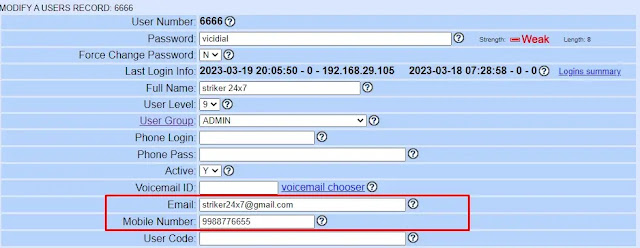
Note: you can also override or disable 2FA for specific users by modifying the user option Two Factor Auth Override;
Two Factor Auth Override: NOT ACTIVE or Disabled.
Default is NOT_ACTIVE which will not override the System Settings for 2FA
Step 2: vicidial 2FA Container
The second step of enabling the 2FA in vicidial is to create the 2FA container with necessary details to send the OTP either via email or phone calls or SMS, below is the sample 2FA container , you can use all three options.
Navigate to ADMIN > Settings Containers
Click Add A Settings Container
Fill the details as shown below
Container ID
Container Notes : 2FA_SETTINGS
Container Type :2FA_SETTINGS
Admin User Group:All Admin User Groups
SUBMIT
Followed to submit fill the Container Entry with below details,
Replace the fields with necessary data like SMS API url path,
auth_code_expire_minutes => 30
auth_code_attempts => 10
auth_code_length => 5
email_auth => YES
email_from => no-reply@vicidial.org
email_subject => VICIdial Login Authentication
email_message => Here is your VICIdial Login Authorization Code: –A–auth_code–B–
phone_auth => YES
phone_prefix => 91
phone_server_ip => 192.168.29.66
phone_cid_number => 123456789
phone_message_override =>
sms_auth => YES
sms_cid_number => 123456789
sms_url => https://sms-gateway-api-url/send?to=1–A–mobile_number–B–&from=123456789&username=USERNAME_HERE&password=PASSWORD_HERE&content=Here%20is%20your%20VICIdial%20login%20authorization%20code%3A%20–A–auth_code–B–
Step 3: Enabling 2FA in System Settings
The final step is to enable the 2FA options under the System settings, under system settings you will two options to enable the 2FATwo-Factor Auth Config Container: Select the 2FA container configured in the Step 2.
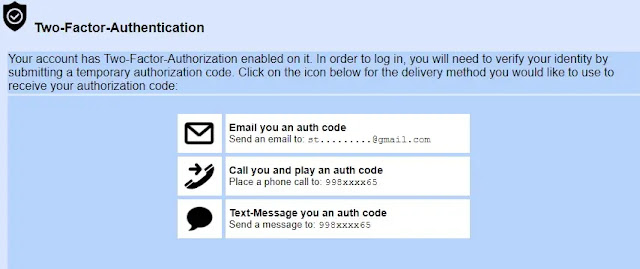
Now logout and login to the vicidial Admin portal ,you will be prompted with the OTP deliver methods like email or phone call or SMS as shown below, Followed with your selection you will receive the OTP .
Workaround For user Lock:
By any chance if you are getting locked by not receiving the OTP ,and if you want to disable the 2FA then run the below Mysql command .
mysql -p
> use asterisk
> UPDATE system_settings SET two_factor_auth_hours=’0′;